
Download StoryPear – AI Children Audio Story Generator
Overview
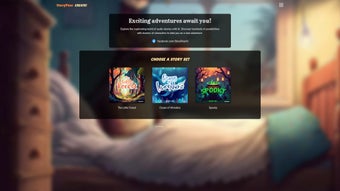
StoryPear is an innovative, AI‑powered audio story generator designed specifically for children. By blending cutting‑edge natural language processing with a library of themed story sets—such as The Little Forest, Ocean of Wonders, Spooky Ethelda, and The Royal Adventurers—StoryPear creates immersive, interactive tales that spark imagination, boost creativity, and encourage critical thinking. Parents, teachers, and caregivers can rely on this secure, web‑based tool to deliver captivating listening experiences without the need for bulky installations or complex setups.
All that’s required is an internet connection, making StoryPear instantly accessible from any modern device. The platform respects user privacy by limiting cookie usage to essential site functions, though a few third‑party cookies may appear for analytics or performance optimization. Overall, StoryPear offers a valuable, child‑friendly resource for families and educators seeking an engaging, educational audio storytelling solution.
Key Features & Benefits
- Themed Story Sets: Choose from four richly illustrated worlds—The Little Forest, Ocean of Wonders, Spooky Ethelda, and The Royal Adventurers—each packed with unique characters and plot arcs.
- AI‑Generated Narratives: The AI engine dynamically weaves characters, dialogues, and plot twists, ensuring each listening session feels fresh and personalized.
- Interactive Elements: Children can select story directions, make simple choices, and hear immediate audio feedback, turning passive listening into active participation.
- Educational Value: Stories embed vocabulary building, moral lessons, and problem‑solving scenarios that align with early childhood learning standards.
- Cross‑Device Accessibility: Since StoryPear runs entirely in a browser, it works on Windows, macOS, ChromeOS, Android, and iOS without additional downloads.
- Parental Controls: Built‑in timers and content filters allow adults to set listening limits and ensure age‑appropriate material.
- Secure & Private: Minimal first‑party cookies, encrypted connections (HTTPS), and a clear privacy policy protect user data.
- Regular Updates: New story packs and feature enhancements are pushed automatically, keeping the library fresh and engaging.
Pros
- Free to use with no hidden subscription fees.
- Instant access—no download or installation required.
- High‑quality, professionally narrated audio.
- AI customization keeps stories novel for repeat listeners.
- Educational content aligns with early literacy goals.
- Responsive design works on tablets, laptops, and smartphones.
Cons
- Requires a stable internet connection; offline mode is not available.
- Third‑party cookies may be present for analytics.
- Limited to the predefined story worlds; user‑generated worlds are not yet supported.
Overall Rating: 4.5/5 – StoryPear delivers a delightful blend of entertainment and education, making it a top choice for families seeking safe, AI‑driven storytelling.
Installation & Usage Guide
StoryPear is a pure web application, which means there is no traditional “installation” process. Follow these simple steps to start generating stories for your child:
- Open a Supported Browser: Launch Chrome, Firefox, Safari, Edge, or any modern browser on your Windows, macOS, Android, or iOS device.
- Visit the Official Site: Navigate to storypear.com. The site automatically detects your operating system and presents an optimized layout.
- Create a Free Account (Optional): While you can generate stories without an account, signing up lets you save favorite stories, set parental controls, and receive new content notifications.
- Select a Story Set: Choose from The Little Forest, Ocean of Wonders, Spooky Ethelda, or The Royal Adventurers. Each set displays a brief synopsis and age‑range recommendation.
- Customize Your Adventure: Use the on‑screen prompts to pick characters, set the mood, or decide on plot directions. The AI instantly generates an audio narrative based on your selections.
- Listen & Interact: Click the “Play” button to hear the story. As the tale unfolds, interactive choice points appear, allowing your child to influence the outcome.
- Adjust Settings: Access the gear icon to enable timers, switch narration speed, or activate subtitles for hearing‑impaired users.
- Save & Share: After the story ends, you can download a short audio clip (up to 2 minutes) or share a link with family members.
StoryPear is compatible with Windows 10/11, macOS 10.15 or later, ChromeOS, Android 8.0 +, and iOS 13 +. Because it runs in a browser, the experience is consistent across all platforms, and the responsive design automatically adjusts to screen size, ensuring a smooth experience on tablets, laptops, and smartphones.
For the best audio quality, we recommend using headphones or external speakers. If you encounter any connectivity issues, try clearing your browser cache or switching to a wired internet connection.
Frequently Asked Questions
Is StoryPear really free?
Yes, StoryPear offers its core story sets and AI generation features completely free of charge. There are no hidden subscription fees, and all users can access the platform with just an internet connection.
Can I use StoryPear offline?
Currently, StoryPear requires an active internet connection because the AI engine runs on cloud servers. An offline mode is under consideration for future updates.
What age range is StoryPear suitable for?
The platform is designed for children aged 4 – 10 years. Each story set includes age‑appropriate language and themes, and parents can enable additional filters for younger listeners.
How does StoryPear protect my child’s privacy?
StoryPear uses HTTPS encryption for all data transfers and stores minimal first‑party cookies. The privacy policy states that no personal data is sold to third parties; however, a few third‑party cookies may be used for analytics and performance monitoring.
Can I create my own characters or story worlds?
At present, StoryPear offers a curated set of characters and worlds. The development team plans to introduce a “Custom World” feature later in the year, allowing users to upload images and define basic story parameters.
Conclusion & Call to Action
StoryPear stands out as a secure, free, and highly engaging tool that transforms traditional storytelling into an interactive, AI‑driven adventure. Its thoughtfully designed story sets, seamless cross‑device compatibility, and educational focus make it an excellent addition to any child’s daily routine—whether at home, in the classroom, or on a family road trip. By encouraging imagination while reinforcing language skills, StoryPear aligns perfectly with modern pedagogical goals. Ready to give your child a magical listening experience?
Click here to start generating free audio stories with StoryPear today!



.png)



